Apache Kafka

Apache Kafka is a popular open-source distributed event streaming platform. Streamtime enables you to deploy and manage Apache Kafka clusters on your Kubernetes fleets with full automation and observability.


When to Use Apache Kafka

  • Open Source Requirements: When you need a fully open-source Kafka distribution without vendor lock-in.
  • Custom Integrations: If you require advanced customization or integration with existing open-source tools.
  • Benchmarking & Testing: For proof-of-concept, benchmarking, or development environments.
  • Cost Control: When you want to avoid commercial licensing costs and manage your own scaling and upgrades.

Create an Apache Kafka Cluster

Before you start: a fleet in Running (or Healthy) state. Pick whichever interface below suits you — they all do the same thing.

  1. Select Cluster Platform
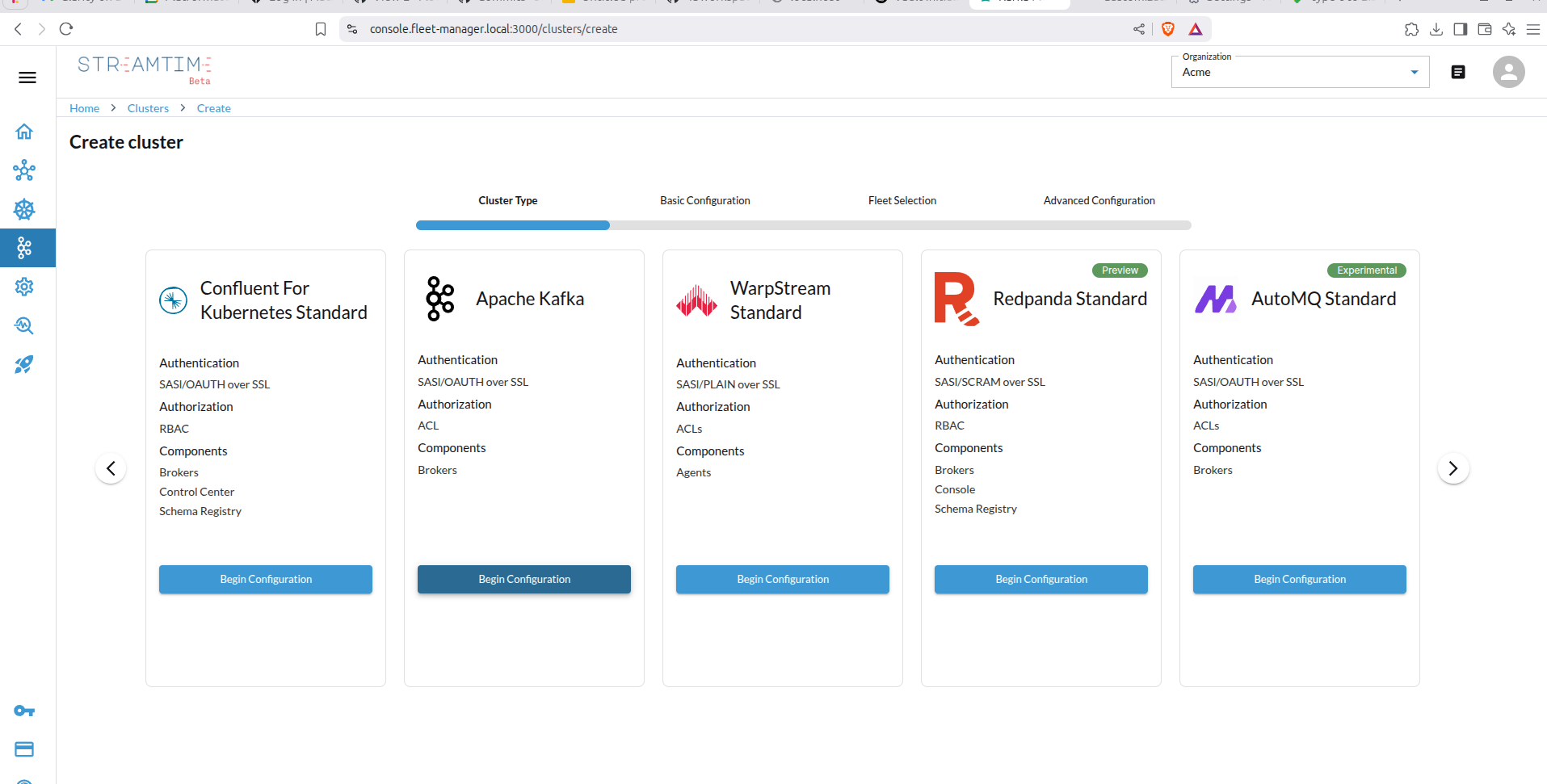
    • In the Streamtime UI, start by creating a new Kafka cluster.
    • Choose Apache Kafka as the cluster platform. Cluster Type
  2. Configure Cluster Basics
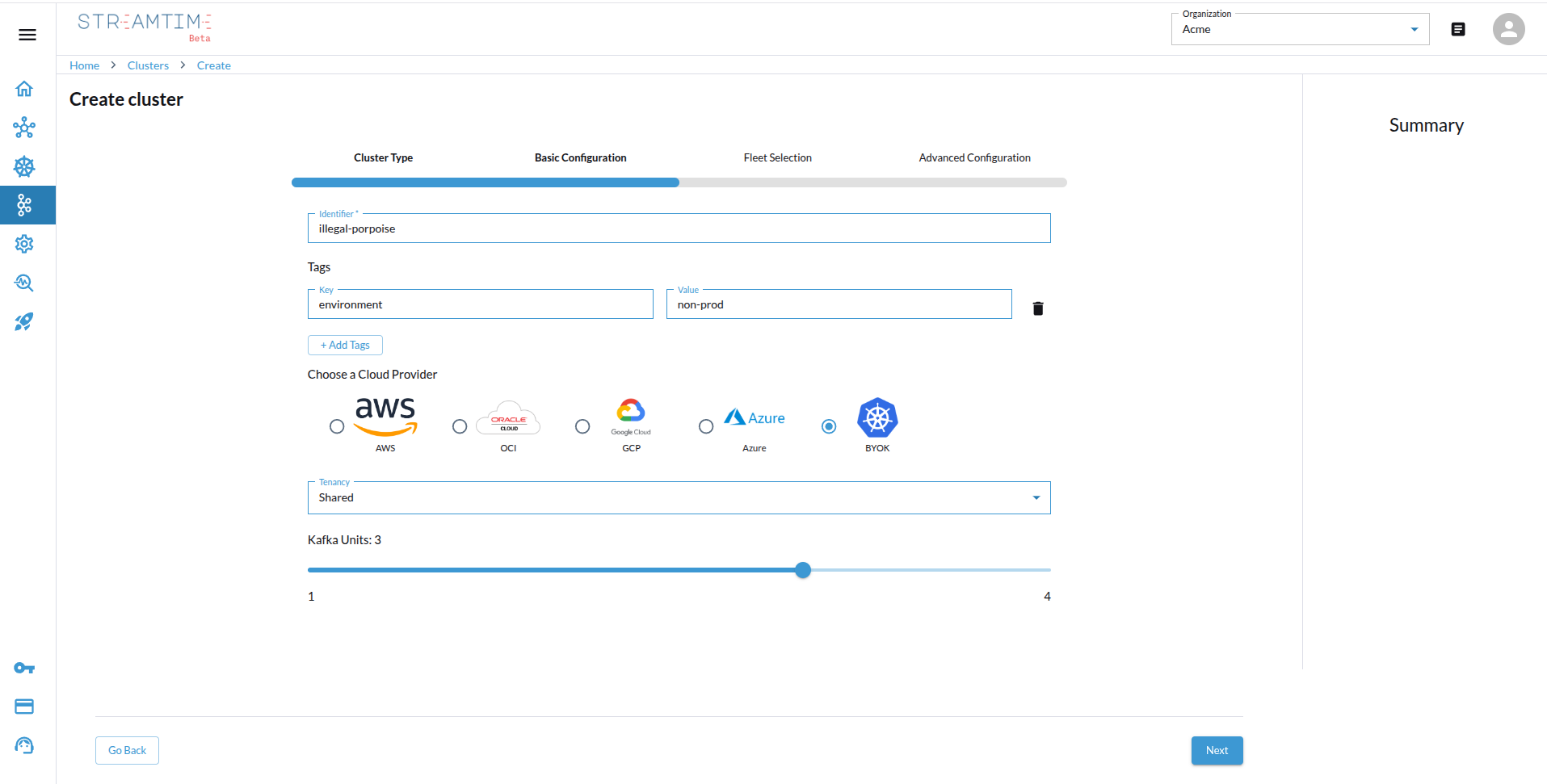
    • Set the cluster name.
    • Select the tenancy mode (shared, isolated, or dedicated).
    • Specify the number of Kafka units required (1 Kafka unit = 20 MBps throughput). Cluster Basics
  3. Select Fleet Placement
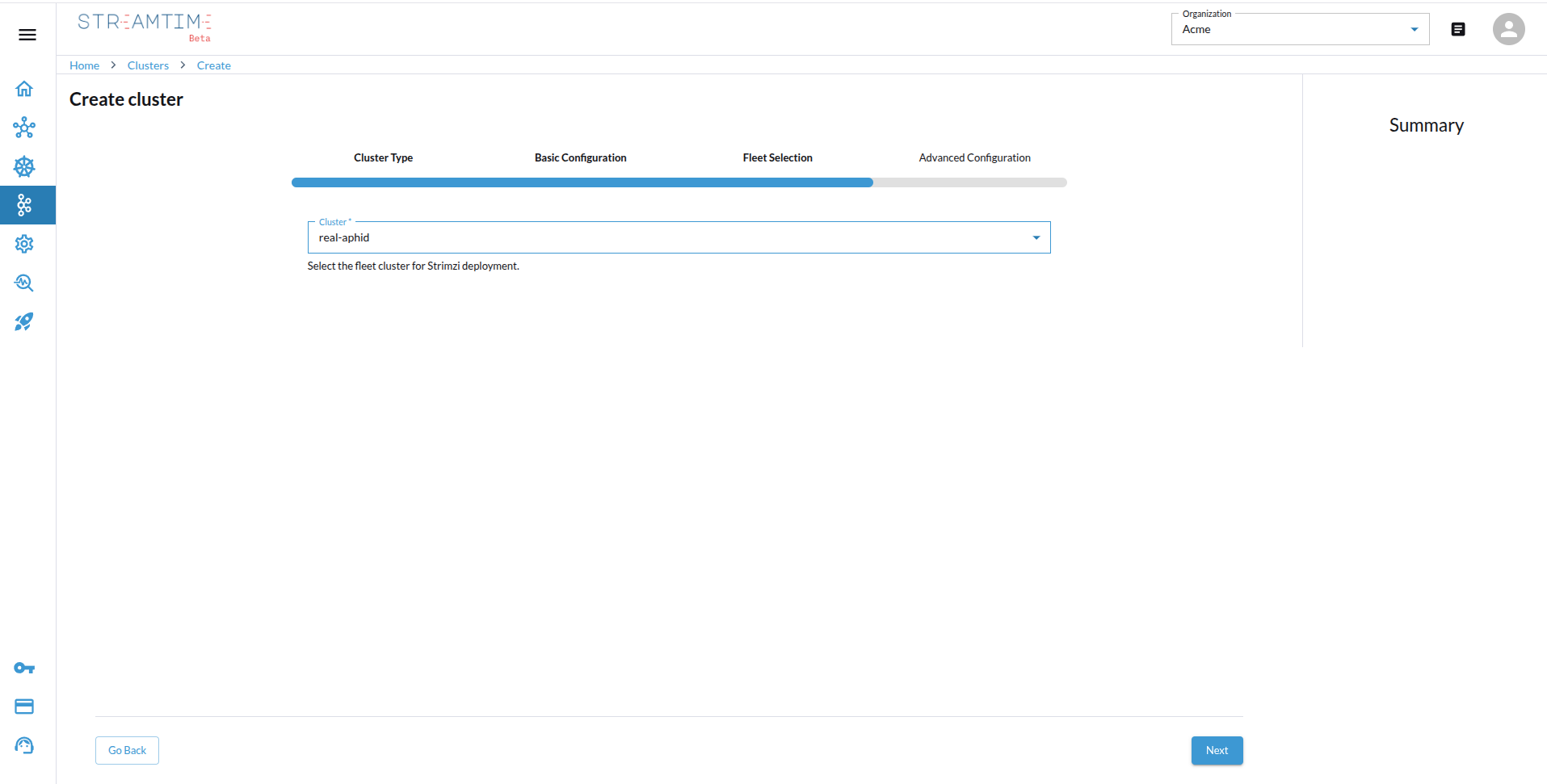
    • Choose the Kubernetes fleet (BYOK or managed cloud) where the cluster will be deployed.
    • Ensure the selected fleet matches your tenancy and sizing requirements. Fleet Selection
  4. Advanced Configuration
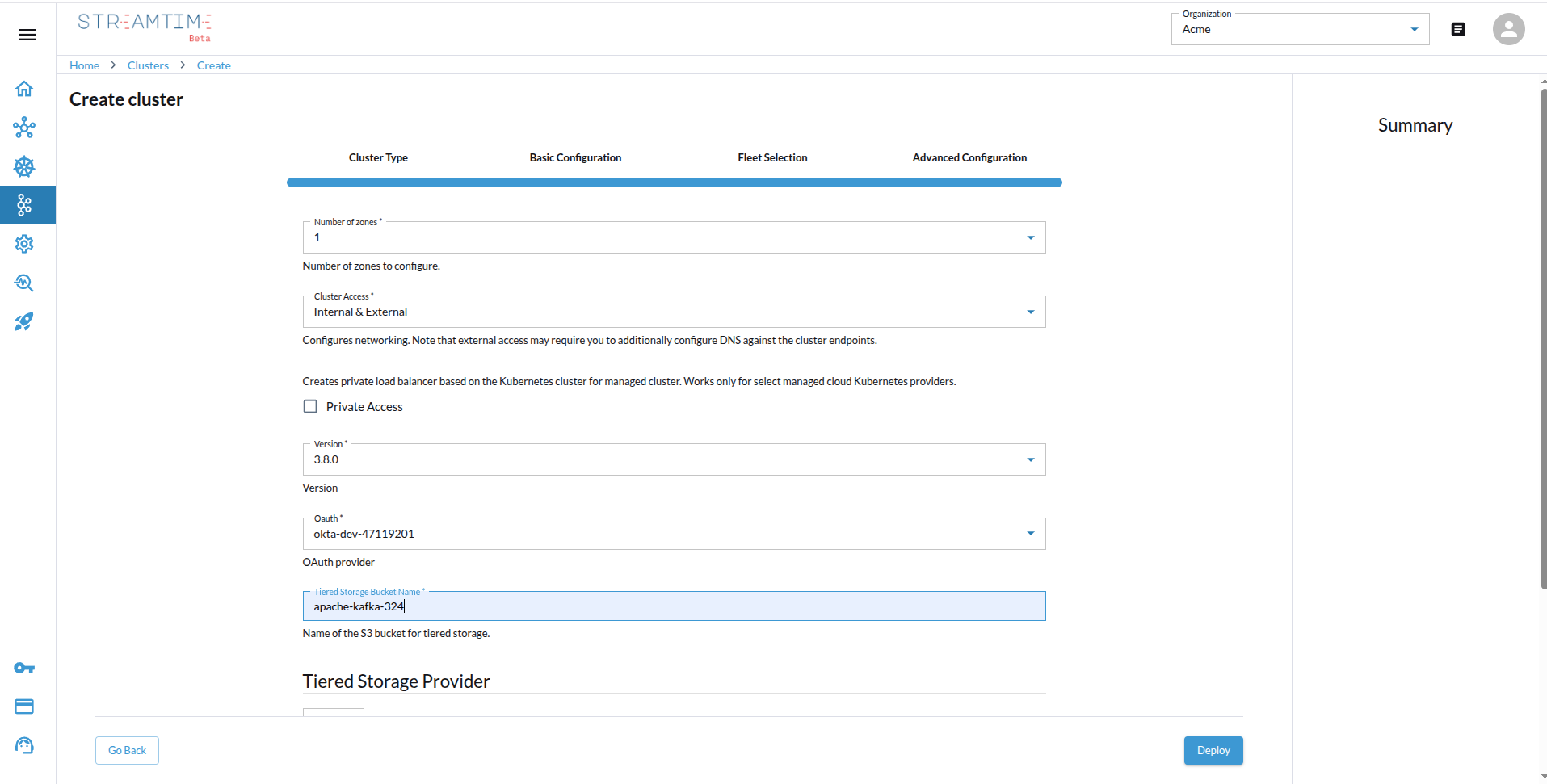
    • Configure authentication (identity provider), storage options, and Apache Kafka version.
    • Enable or disable auto-upgrade based on your operational preferences. Advanced Configuration
The cluster appears in the list with the status Provisioning, then Running.

curl -X POST https://<streamtime-api-endpoint>/organizations/<your-org-id>/kafka/ \
  -H "Authorization: Bearer YOUR_API_TOKEN" \
  -H "Content-Type: application/json" \
  -d '{
    "identifier": "dutch-mammal",
    "cluster_type": "strimzi",
    "kafka_units": 3,
    "provisioner_name": "",
    "tenancy_mode": "Shared",
    "advanced_config": {
        "number_of_zones": "1",
        "cluster_access": "Internal & External",
        "private_access": false,
        "version": "3.8.0",
        "oauth": "okta-dev-47119201",
        "tiered_storage_bucket_name": "apache-kafka-32421",
        "tiered_storage_provider": {
            "aws_account": "platformatory",
            "aws_region": "us-east-1"
        },
        "tiered_storage_create_bucket": true
    },
    "tags": [
        {
            "key": "environment",
            "value": "non-prod"
        }
    ],
    "organization": "<your-org-id>",
    "cloud_provider": "aws",
    "region": "us-east-1",
    "infrastructure": "sympathetic-emu"
}'

Response:

{
    "id": "1a0b72d5-96b9-4123-9cec-71446b6bf45c",
    "organization": "<your-org-id>",
    "infrastructure": "sympathetic-emu",
    "identifier": "dutch-mammal",
    "cluster_type": "strimzi",
    "tenancy_mode": "Shared",
    "kafka_units": 3,
    "status": "Pending",
    "created_at": "2025-07-17T09:49:48.972570Z",
    "updated_at": "2025-07-17T09:49:48.972586Z"
}

Poll the cluster until its status reports Running:

curl -X GET "https://<streamtime-api-endpoint>/organizations/<your-org-id>/kafka/dutch-mammal/" \
  -H "Authorization: Bearer YOUR_API_TOKEN"

Fields shown are derived from the committed OpenAPI snapshot; not executed against a live deployment.

from streamtime_sdk.api.default import organizations_kafka_create
from streamtime_sdk.models import KafkaCreate

organizations_kafka_create(
    organization="<your-org-id>",
    body=KafkaCreate(
        identifier="dutch-mammal",
        cluster_type=KafkaClusterType.STRIMZI,
        kafka_units=3,
        tenancy_mode=KafkaTenancyMode.SHARED,
        infrastructure="sympathetic-emu",
    ),
)
import { organizationsKafkaCreate } from "@streamtime/api";

await organizationsKafkaCreate({
  path: { organization: "<your-org-id>" },
  body: {
    identifier: "dutch-mammal",
    cluster_type: "strimzi",
    kafka_units: 3,
    tenancy_mode: "Shared",
    infrastructure: "sympathetic-emu",
  },
});
resp, err := http.Post(
    "https://<streamtime-api-endpoint>/organizations/<org>/kafka/",
    "application/json",
    strings.NewReader(`{"identifier":"dutch-mammal","cluster_type":"strimzi",`+
        `"kafka_units":3,"tenancy_mode":"Shared","infrastructure":"sympathetic-emu"}`),
)
// Set Authorization: Bearer <token> on the request.
streamtime kafka create \
  --identifier dutch-mammal \
  --workload strimzi \
  --fleet sympathetic-emu \
  --kafka-units 3

Then check on it:

streamtime kafka status dutch-mammal

MCP reads cluster state; it does not create clusters. Ask in plain language, e.g. “what is the status of the dutch-mammal cluster?”, or use the get_cluster_status and list_kafka_providers tools.