Streamtime creates and runs a Kubernetes cluster (Oracle Kubernetes Engine, OKE) in your OCI tenancy, then installs what the fleet’s workloads need. You register the account once, then create fleets on it.
Key Features
Managed Kubernetes: Streamtime creates, monitors and deletes the OKE cluster for you.
Your network or a new one: use an existing VCN, or let Streamtime create one.
Your encryption key: optionally encrypt the cluster with a key from OCI Vault.
Tenancy: Shared, Isolated or Dedicated. See Tenancy.
Monitoring: metrics, logs and alerts for the fleet and everything on it.
Prerequisites
A user with the right permissions. Create a group for Streamtime (for example streamtime-admins), add the user to it, and attach a policy that lets the group manage resources in the fleet’s compartment:
Allow group <group-name> to manage all-resources in compartment id <compartment-id>
Streamtime then creates and manages compute, networking, storage and OKE resources in that compartment.
An API key for that user. See Managing API keys. You need its fingerprint and the unencrypted private key.
A compartment for the fleet, and its OCID (OCI Console → Identity & Security → Compartments).
A Base Domain for the fleet’s endpoints, added under Settings.
Optionally, an SSH public key to reach the worker nodes, and a KMS key in OCI Vault to encrypt the cluster. OKE must be allowed to use the key.
Cloud account credentials
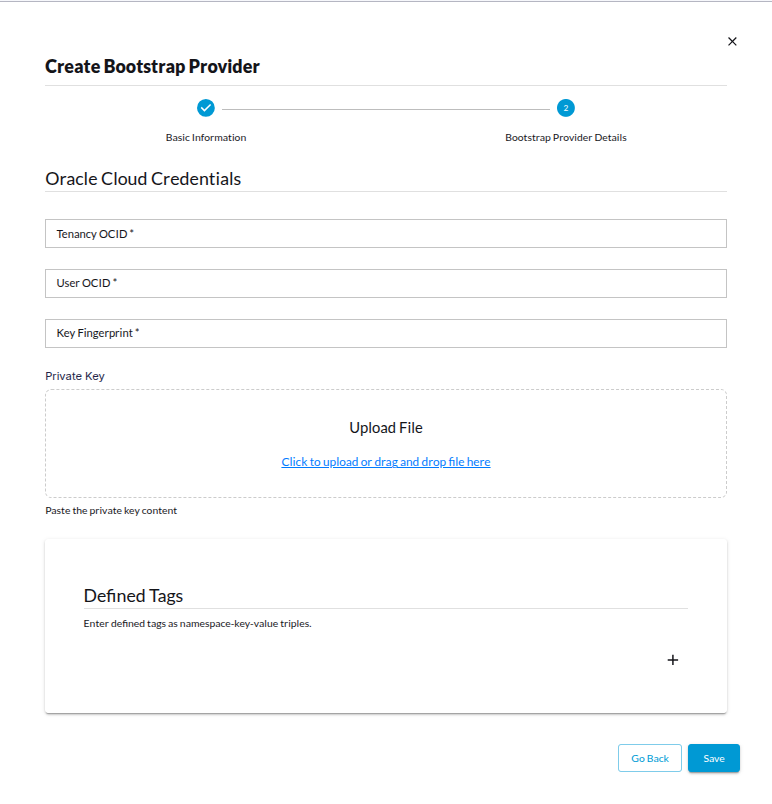
Tenancy OCID: the tenancy Streamtime creates resources in.
User OCID: the user from step 1.
Key Fingerprint and Private Key: the API key from step 2.
Defined Tags (optional): tags, as namespace, key and value, that Streamtime adds to every resource it creates, for ownership, cost and auditing.
Domain OCID (optional): the Identity Domain where Streamtime creates the user for the logs bucket. Without it, the tenancy’s default domain is used; set it when the user can’t use the default domain.
Fleet settings
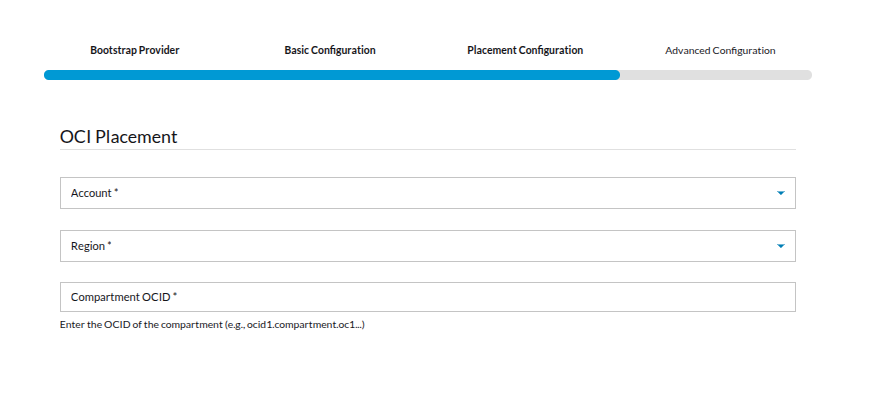
Placement Configuration
Account: the cloud account you registered.
Region: ap-mumbai-1 or ap-hyderabad-1.
Compartment ID: the compartment’s OCID.
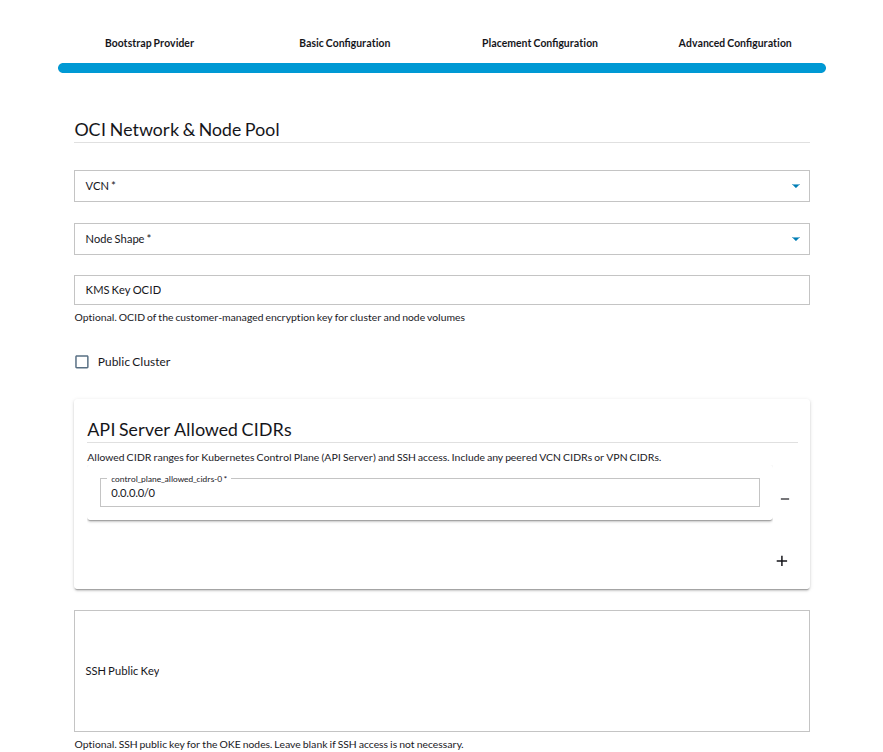
Advanced Configuration
VCN ID: an existing VCN, or leave it empty to create a new one. Make sure an existing VCN has enough addresses for the nodes and services.
Node Shape: the worker nodes’ shape (default VM.Standard.E4.Flex; also VM.Standard3.Flex, VM.Standard.A1.Flex, VM.Standard.E5.Flex).
Logs Storage Bucket Name (required): an Object Storage bucket name, unique across OCI.
KMS Key ID: optional; without it, Oracle-managed keys are used.
Public Cluster: whether the Kubernetes API is reachable from the internet (on by default).
API Server Allowed CIDRs: the address ranges allowed to reach the Kubernetes API and SSH. The default 0.0.0.0/0 allows everyone; restrict it to your office or VPN ranges.
SSH Public Key: optional; leave it empty if you don’t need SSH access to the nodes.
Before you start
A Base Domain for the fleet’s endpoints, added under Settings.
For the API: an access token in STREAMTIME_TOKEN and your organization identifier in place of <org>. Replace api.example.com with your Streamtime API address.
Only administrators and infrastructure administrators can manage fleets and cloud accounts.
packagemainimport("bytes""crypto/rand""encoding/hex""encoding/json""net/http""os")constapi="https://api.example.com/organizations/<org>"// newKey returns a random idempotency key.funcnewKey()string{b:=make([]byte,16)rand.Read(b)returnhex.EncodeToString(b)}// call sends one request with the access token and a JSON body (or none).// An optional idempotency key is sent as the Idempotency-Key header.funccall(method,pathstring,bodyany,idempotencyKey...string)(*http.Response,error){varbufbytes.Bufferifbody!=nil{iferr:=json.NewEncoder(&buf).Encode(body);err!=nil{returnnil,err}}req,err:=http.NewRequest(method,api+path,&buf)iferr!=nil{returnnil,err}req.Header.Set("Authorization","Bearer "+os.Getenv("STREAMTIME_TOKEN"))req.Header.Set("Content-Type","application/json")iflen(idempotencyKey)>0{req.Header.Set("Idempotency-Key",idempotencyKey[0])}returnhttp.DefaultClient.Do(req)}
Register the cloud account
A cloud account holds the credentials Streamtime uses to create resources in your OCI account. Register it once; every fleet on that account uses it.
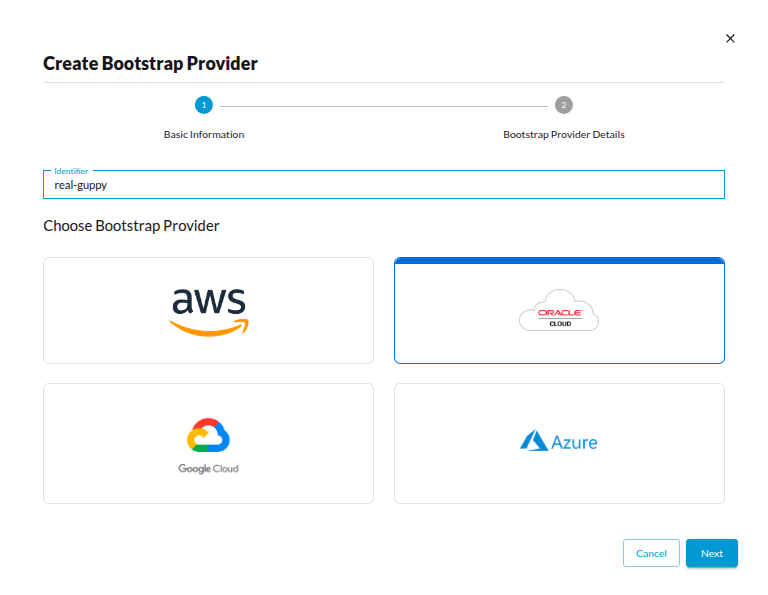
Go to Settings, then Bootstrap Providers, and select + Add Bootstrap Provider.
Basic Information: enter an Identifier for the account (lowercase letters, digits and dashes, up to 24 characters).
Bootstrap Provider Details: choose OCI and fill in its credentials (see Prerequisites), then save.
The account appears in the list. Some clouds, such as AWS, are checked as you save: Streamtime refuses credentials the cloud rejects and says why. Streamtime checks the permissions again when you create a fleet.
Returns 201 with the account. For some clouds, such as AWS, Streamtime checks the credentials with the cloud first and returns 400 with the cloud’s reason when they are rejected.
Fill the credentials from sensitive variables or your secrets store, not from values written in the file. Terraform doesn’t read credentials back, so a change made outside Terraform isn’t detected. To manage an account that already exists, import it by identifier: terraform import streamtime_cloud_account.oci <cloud-account>, then set configuration and apply. See streamtime_cloud_account.
To change the credentials later, select Edit Credentials on the account in the UI, send PATCH $API/bootstrap-providers/<cloud-account>/ with a new configuration, or change configuration in Terraform and apply. Changing them from the CLI isn’t available yet.
Networks
A network is the VCN a fleet runs in. You don’t need one to create a fleet: without it, the fleet creates its own (see Fleet settings). Create a network when you want to manage it separately from any fleet. Leave out Existing Network ID and Streamtime creates the network in your cloud account; give the ID of one you already have and Streamtime only records it.
Create a network
In the sidebar, select Network, then Create network.
In Create Network, choose the Bootstrap Provider (your cloud account), enter an Identifier (lowercase letters, digits and dashes, up to 24 characters), a Name, the Region and, optionally, the CIDR. Enter the Compartment ID (OCI) to create the network in.
To use a network you already have, enter its ID in Existing Network ID instead of leaving it empty.
Select Create.
The network appears in the list. A new one is empty until Streamtime has created it in the cloud; refresh the list to see its ID.
Returns 201 with the network. identifier, provider (the cloud account) and name are required. Without network_id, Streamtime starts creating the network in the cloud and fills network_id in when it’s done: poll GET $API/networks/<network>/ until network_id has a value. With network_id, nothing is created.
The typed Network model marks server-set fields as required, so send the body with the SDK’s HTTP client:
resp=client.get_httpx_client().post(f"/organizations/{ORG}/networks/",json={"identifier":"ledger-vcn","provider":"<cloud-account>","name":"ledger-vcn","region":"ap-hyderabad-1","cidr":"10.3.0.0/22","compartment_id":"ocid1.compartment.oc1..<id>"},)resp.raise_for_status()print(resp.json()["identifier"])# poll until "network_id" is set
The generated Network type doesn’t list every field the request takes, so send the body through the client directly:
const{data}=awaitclient.post({url:"/organizations/{org_identifier}/networks/",path:{org_identifier:org},body:{"identifier":"ledger-vcn","provider":"<cloud-account>","name":"ledger-vcn","region":"ap-hyderabad-1","cidr":"10.3.0.0/22","compartment_id":"ocid1.compartment.oc1..<id>"},});console.log((dataas {identifier:string}).identifier);// poll until network_id is set
resp,err:=call("POST","/networks/",json.RawMessage(`{"identifier": "ledger-vcn", "provider": "<cloud-account>", "name": "ledger-vcn", "region": "ap-hyderabad-1", "cidr": "10.3.0.0/22", "compartment_id": "ocid1.compartment.oc1..<id>"}`))// resp.StatusCode is 201; poll call("GET", "/networks/<network>/", nil)// until "network_id" has a value.
List networks with streamtime network list -O json, and show one with streamtime network get <network>.
Not available in MCP yet. Create the network from the UI, API or CLI.
# Record a VCN you already have: set network_id and nothing is created.resource"streamtime_network""existing"{identifier="ledger-vcn"name="ledger-vcn"cloud_account=streamtime_cloud_account.oci.identifiernetwork_id="ocid1.vcn.oc1..<id>"}
Terraform can’t create a new VCN yet: creating one needs a compartment, and streamtime_network has no setting for it. Create the VCN from the UI, API or CLI, or in OCI, then record it here. To manage a network that already exists in Streamtime, import it by identifier: terraform import streamtime_network.existing ledger-vcn. See streamtime_network.
Delete a network
Deleting a network removes it from Streamtime only. The VCN stays in your cloud account, and so do the resources in it. Remove them in the cloud console or CLI if you no longer need them.
In the sidebar, select Network.
Select the delete icon on the network’s row and confirm.
resp,err:=call("DELETE","/networks/<network>/",nil)// resp.StatusCode is 204.
streamtime network delete <network> --yes
Not available in MCP yet. Delete the network from the UI, API or CLI.
Remove the streamtime_network block and run terraform apply, or run terraform destroy -target=streamtime_network.<name>. As above, this removes the record from Streamtime and leaves the cloud network in place.
Create a fleet
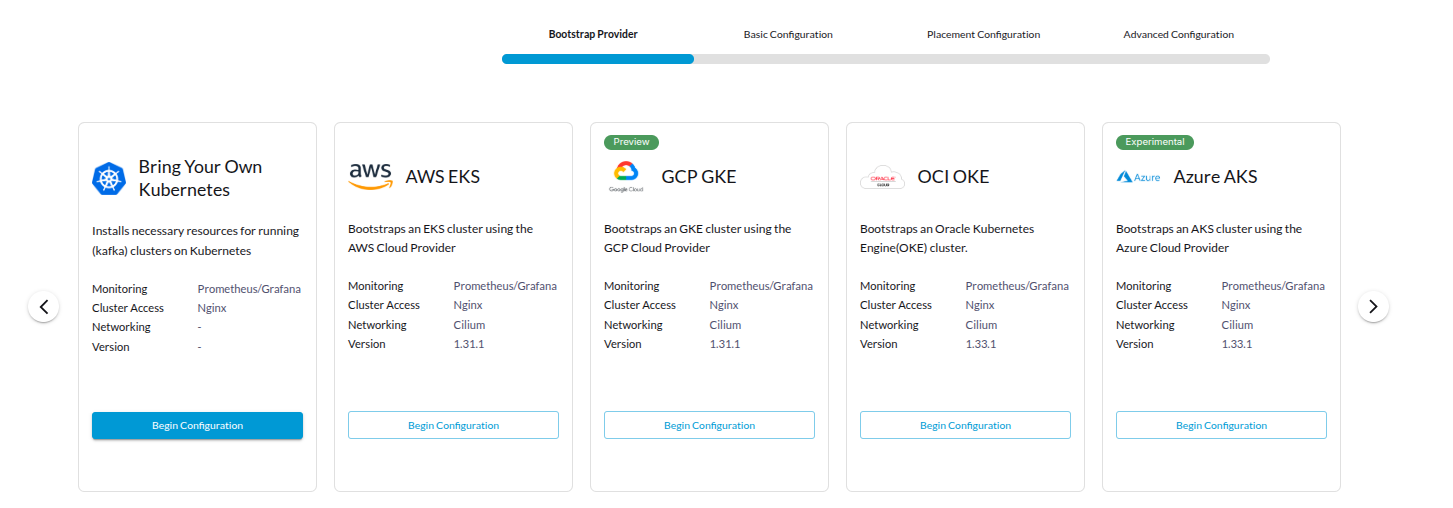
In the sidebar, select Fleet, then + Add Fleet.
Bootstrap Provider: choose OCI, then select Next.
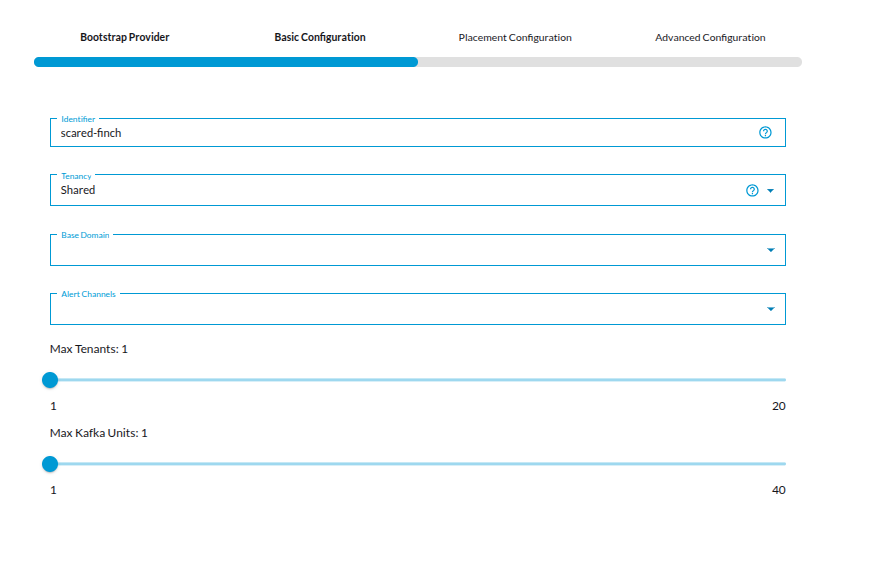
Basic Configuration: enter an Identifier, choose the Tenancy (Shared, Isolated or Dedicated), the Base Domain and Max Tenants (how many clusters the fleet can host). Under Workloads, choose what the fleet runs (Streaming, Stream Processing, Analytics) and how much capacity each gets; only the services those workloads need are installed. Optionally turn on Enable autoscale for workload node pool and Enable AI, and pick accounts under How should this fleet be monitored?
Placement Configuration: choose the cloud account and where the fleet runs (see Fleet settings).
Advanced Configuration: review the network and node settings.
Review the cost estimate on the right and select Deploy.
The fleet appears in the list as Pending, then Provisioning, then Healthy. Creating the Kubernetes cluster can take 20 minutes or more.
If you leave the wizard early, the fleet is kept as a draft (Incomplete). Open it from the list to pick up where you left off.
Creating a fleet takes two requests. The first saves the fleet; the second starts provisioning it.
# 1. Save the fleet. The response includes "generation" and "configuration_state".
curl -X POST "$API/fleet/"\-H"Authorization: Bearer $STREAMTIME_TOKEN"\-H"Content-Type: application/json"\-d'{
"identifier": "ledger-south",
"provider": "oci",
"domain": "<base-domain>",
"tenancy_mode": "Shared",
"placement_config": {"account": "<cloud-account>", "region": "ap-hyderabad-1", "compartment_id": "ocid1.compartment.oc1..<id>"},
"advanced_config": {"oci_node_shape": "VM.Standard.E4.Flex", "oci_logs_storage_bucket_name": "<logs-bucket>"}
}'# 2. Start provisioning that generation.
curl -X POST "$API/fleet/ledger-south/reconcile/"\-H"Authorization: Bearer $STREAMTIME_TOKEN"\-H"Content-Type: application/json"\-H"Idempotency-Key: $(uuidgen)"\-d'{"generation": 1}'
identifier, provider and domain are required. Provisioning can start only once configuration_state is valid: the placement and advanced settings are complete. List the settings and their allowed values with GET $API/fleet/configuration-profiles/oci/placement-configuration/ and POST $API/fleet/configuration-profiles/oci/advanced-configuration/.
Add workloads to choose what the fleet runs, for example {"streaming": {"enabled": true, "providers": ["strimzi"], "units": 6}}. Without it, every workload is enabled.
The second request returns 202 with the operation it started. Retrying with the same Idempotency-Key returns that operation again. A 409 means the generation is out of date (send the generation from GET $API/fleet/ledger-south/) or the configuration is incomplete.
When the settings are complete, the command also starts provisioning. If they aren’t, it saves the fleet and says what’s missing; finish the settings, then run streamtime fleet reconcile ledger-south.
Choose workloads with --streaming, --stream-processing and --analytics (each takes a comma-separated list of providers) and their --…-units options. Without them, every workload is enabled.
Not available in MCP yet. Create the fleet from the UI, API or CLI.
resource"streamtime_fleet""ledger_south"{identifier="ledger-south"fleet_provider="oci"domain="<base-domain>"tenancy_mode="Shared"placement_config=jsonencode({"account":"<cloud-account>","region":"ap-hyderabad-1","compartment_id":"ocid1.compartment.oc1..<id>"})advanced_config=jsonencode({"oci_node_shape":"VM.Standard.E4.Flex","oci_logs_storage_bucket_name":"<logs-bucket>"})# The placement refers to the account by name, so tell Terraform to# create the account first.depends_on=[streamtime_cloud_account.oci]timeouts={create="90m"delete="60m"}}
terraform apply saves the fleet, starts provisioning it, and waits until it is ready, so allow for the OCI cluster taking 20 minutes or more (the timeouts block). Read the placement_config and advanced_config fields OCI accepts, and their allowed values, from the streamtime_fleet_configuration_profile data source. They match the API’s fleet settings.
Changes to placement_config or advanced_config on a running fleet are saved but not applied yet (see Update the fleet or the Agent). To manage a fleet that already exists, import it by identifier: terraform import streamtime_fleet.ledger_south ledger-south. See streamtime_fleet.
Check fleet status
A fleet’s Status is one of Incomplete, Pending, Provisioning, Updating, Restarting, Deleting, Healthy or Error. The Agent’s connection and the installed components show whether Streamtime can reach the fleet and what it runs.
In the sidebar, select Fleet. Each fleet’s status shows in the list.
Open the fleet. Overview shows its status, tenancy, Kafka Units and capacity. Endpoints lists its addresses, and Monitoring its metrics.
Agent Management shows whether the Agent is installed and connected, with the history of its operations.
# Status and provisioning state
curl -s"$API/fleet/ledger-south/"-H"Authorization: Bearer $STREAMTIME_TOKEN"# Collect a fresh health report from the fleet (waits for the answer)
curl -s-X POST "$API/fleet/ledger-south/status/"-H"Authorization: Bearer $STREAMTIME_TOKEN"# The Agent's connection
curl -s"$API/fleet/ledger-south/agent/"-H"Authorization: Bearer $STREAMTIME_TOKEN"# Installed components
curl -s"$API/fleet/ledger-south/installed-components/"-H"Authorization: Bearer $STREAMTIME_TOKEN"
In the fleet, status is the fleet’s state and reconciliation_state the state of its last operation (queued, running, succeeded or failed). GET $API/fleet/ledger-south/status/ returns the last health report without collecting a new one. The Agent’s status reads bootstrap_complete once it is installed and the fleet is set up.
resp,err:=call("GET","/fleet/ledger-south/",nil)// Decode "status" and "reconciliation_state" from resp.Body.resp,err=call("POST","/fleet/ledger-south/status/",nil)// fresh health reportresp,err=call("GET","/fleet/ledger-south/agent/",nil)// Agent connection
streamtime fleet list
streamtime fleet get ledger-south
streamtime fleet status ledger-south
streamtime fleet kubeconfig ledger-south --save ./ledger-south.kubeconfig
fleet status shows the last health report. Showing the Agent’s connection or the installed components isn’t available in the CLI yet.
Ask your assistant, for example: “Is the ledger-south fleet healthy?” or “What alerts fired on ledger-south in the last hour?”
It uses get_fleet_status (pass refresh to collect a fresh report), list_fleet_resources, get_fleet_alerts, get_fleet_logs and get_fleet_metric.
Update the fleet or the Agent
You can turn the workload node pool’s autoscaling on or off, and change the accounts that receive the fleet’s monitoring data. Streamtime can’t apply changes to a fleet’s placement or advanced settings yet: they are saved, but the update operation fails. To change them, create a new fleet.
The Agent is the Streamtime component that runs inside the fleet. Update it to a new version from Agent Management.
Open the fleet and select Agent Management.
Open the actions menu (⋮) and select Update Agent.
In Update Streamtime Agent, choose the Target (Worker or Operator) and the Registry, then set the Image Tag (leave it empty for the latest), or the Chart Version or Helm Values you want to change. Start the update.
The operation shows under Command History until it finishes.
# Turn autoscaling of the workload node pool off
curl -X PATCH "$API/fleet/ledger-south/"\-H"Authorization: Bearer $STREAMTIME_TOKEN"\-H"Content-Type: application/json"\-d'{"autoscale": false}'# Update the Agent to a new version
curl -X POST "$API/fleet/ledger-south/agent/UpdateStreamtimeAgentWorkflow/"\-H"Authorization: Bearer $STREAMTIME_TOKEN"\-H"Content-Type: application/json"\-d'{
"update_types": ["agent"],
"registry_url": "<registry>",
"repository": "<repository>",
"agent": {"image_tag": "<version>"}
}'
registry_url and repository are where your Streamtime installation publishes the Agent image; ask your Streamtime administrator. The update returns 201 with the operation it started. Follow it with GET $API/fleet/ledger-south/agent/.
resp,err:=call("PATCH","/fleet/ledger-south/",map[string]any{"autoscale":false})resp,err=call("POST","/fleet/ledger-south/agent/UpdateStreamtimeAgentWorkflow/",map[string]any{"update_types":[]string{"agent"},"registry_url":"<registry>","repository":"<repository>","agent":map[string]any{"image_tag":"<version>"},})// resp.StatusCode is 201 once the update has started.
Not available in the CLI yet. Update the fleet or the Agent from the UI or the API.
Not available in MCP yet. Update the fleet or the Agent from the UI or the API.
Delete the fleet
Delete every cluster and workload on the fleet first; Streamtime refuses to delete a fleet that still hosts one. Deleting the fleet removes the resources Streamtime created for it.
In the sidebar, select Fleet.
Open the fleet’s menu in the list, select Delete, and confirm.
The fleet shows Deleting, then disappears from the list.
Returns 202 with the delete operation it started. 403 means the fleet still hosts Kafka clusters; 409 means it still has Kafka Connect clusters, replicators or virtual Kafka clusters. Delete those first. Poll GET $API/fleet/ledger-south/: it shows Deleting, then returns 404 once the fleet is gone.
fromstreamtime_sdk.api.fleetimportorganizations_fleet_destroyresp=organizations_fleet_destroy.sync_detailed(ORG,"ledger-south",client=client)print(resp.status_code)# 202; 403 or 409 while workloads remain
resp,err:=call("DELETE","/fleet/ledger-south/",nil)// resp.StatusCode is 202 (403 or 409 while workloads remain);// poll GET /fleet/ledger-south/ until it returns 404.
streamtime fleet delete ledger-south --yes
Not available in MCP yet. Delete the fleet from the UI, API or CLI.
Or remove the streamtime_fleet block and run terraform apply. Terraform starts the delete and waits until the fleet is gone (the delete timeout). Streamtime refuses the delete while the fleet still hosts workloads, so remove those first.
Remove the cloud account
Delete every fleet on the account first, and wait until they are gone. Streamtime doesn’t stop you from removing an account that fleets still use, and without it those fleets can’t be torn down.
resp,err:=call("DELETE","/bootstrap-providers/<cloud-account>/",nil)// resp.StatusCode is 204.
streamtime provider delete <cloud-account> --yes
Not available in MCP yet. Remove the account from the UI, API or CLI.
# Preview what will be removed, then remove it.
terraform plan -destroy-target=streamtime_cloud_account.oci
terraform destroy -target=streamtime_cloud_account.oci
Terraform deletes the fleets that depend on the account first when they are in the same configuration, so check that the plan lists them. It only follows dependencies it can see: fleets managed in another configuration or outside Terraform aren’t checked, so delete them first, as above.